Blog
Replace Shopify Scripts Without Rewriting Your Discount Logic
Shopify Scripts retires June 30, 2026. There are three real ways to replace it. This post explains when each fits, what the migration actually costs, and how a config-driven engine sidesteps a full rewrite.
·11 min read
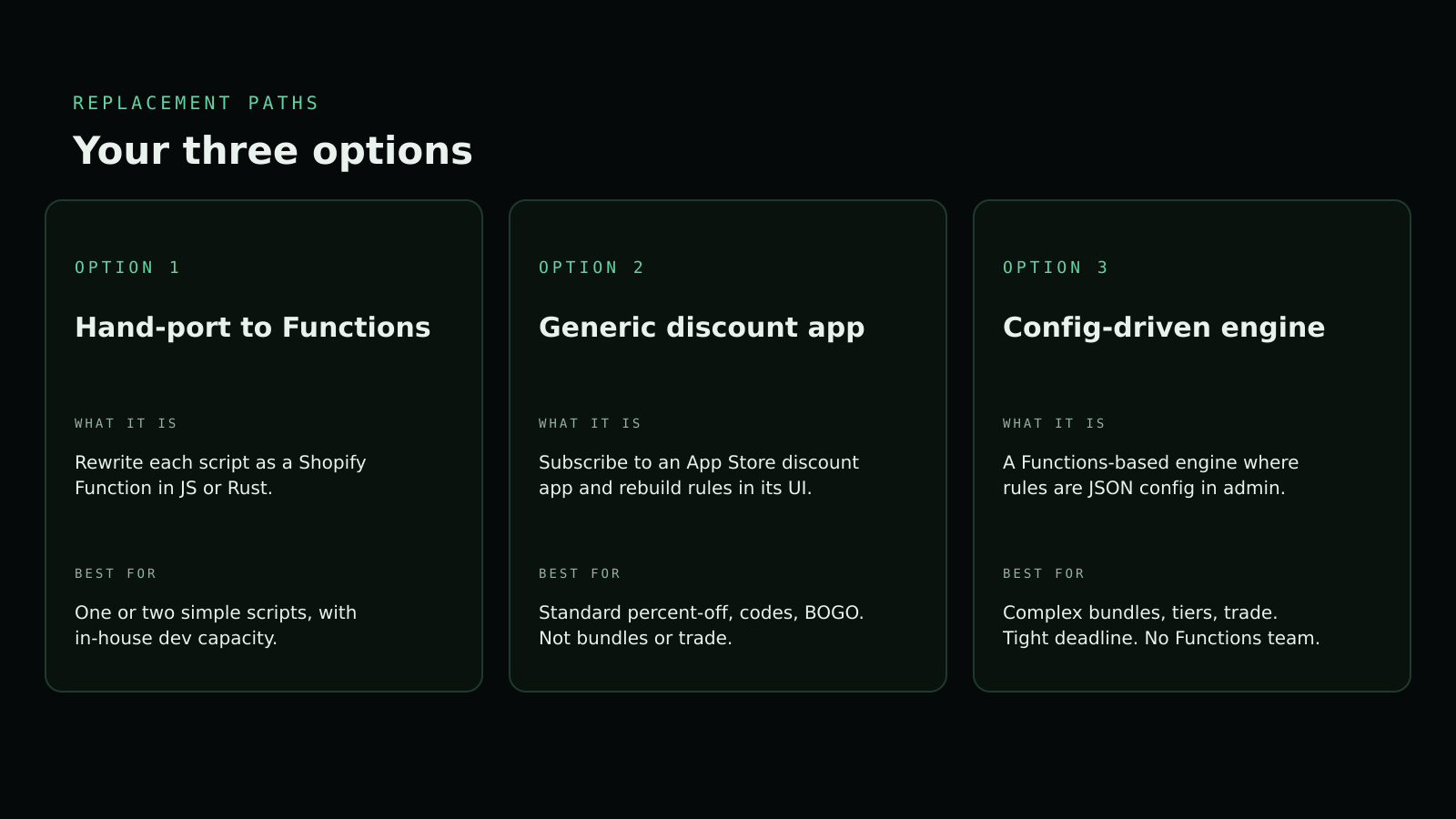
TL;DR. You have three options for replacing Shopify Scripts: hand-port every script to a Shopify Function, switch to a generic discount app, or run a config-driven engine on top of Functions. Hand-porting is correct for one or two simple scripts and a dev team with capacity. Generic apps cover standard discounts but break on bundle math and trade pricing. A config-driven engine is the shortcut when the rules are complex and the deadline is real. Background on the sunset itself is in Shopify Scripts Sunset.
The hidden cost of "just rewrite it in Functions"
Shopify Functions is the right runtime. The problem is everything around it. To ship a single Function in production you need:
- A separate Rust or JavaScript codebase, distinct from your theme.
- The Shopify CLI installed locally and in CI.
- A choice between the Discount API and the Cart Transform API for every rule (different capabilities, different limits).
- A testing harness — Shopify's CLI runs Functions locally but does not simulate a full cart, so a test layer is on you.
- Versioning, deployment, and rollback through
shopify app deploy. - Awareness of activation caps — Shopify limits each Function API to 25 active functions, so stacking Functions across many discount rules can hit the ceiling.
Concretely: a tiered discount that takes twelve lines of config in an engine looks like this in raw Functions JavaScript:
// shopify-function: discount.run.js (excerpt)
export function run(input) {
  const TIERS = [
    { qty: 6, percent: 20 },
    { qty: 3, percent: 10 },
  ];
  const sofas = input.cart.lines.filter((l) => l.merchandise.product.tags.includes('sofa'));
  const totalQty = sofas.reduce((n, l) => n + l.quantity, 0);
  const tier = TIERS.find((t) => totalQty >= t.qty);
  if (!tier) return { discounts: [] };
  return {
    discounts: [
      {
        targets: sofas.map((l) => ({ productVariant: { id: l.merchandise.id, quantity: l.quantity } })),
        value: { percentage: { value: tier.percent } },
        message: `${tier.percent}% off ${totalQty} sofas`,
      },
    ],
    discountApplicationStrategy: 'FIRST',
  };
}
Plus the shopify.app.toml registration, plus a tests/discount.run.test.js mock harness, plus a deploy. The same logic in a config-driven engine is a JSON object the merchant edits in Shopify Admin. Both produce the same Function output; only one needs an engineer.
Option A — Hand-port to Functions
When it fits. One or two simple scripts (a single percent-off, a shipping-method hide). In-house developer team with Shopify Functions experience. No deadline pressure — you can spend a quarter on tooling and tests.
When it does not. More than three scripts, or any rule with bundle math, tier overlap, or trade-customer gating. The toolchain cost is per-script, not amortised.
Effort estimate. A simple percent-off script is one to two developer days end-to-end (CLI setup, Function code, deploy, smoke test). A bundle script with shared quantity pools is one to three weeks. Multiply by the number of scripts and add 30% for review and rollback runs.
Option B — Generic discount apps
When it fits. Standard percent-off, fixed-amount, BOGO, code-based discounts. A handful of rules, all expressible as "if cart contains X, apply Y."
Where they fall over.
- Bundle math. Most apps treat bundles as a single virtual SKU rather than a discount applied to multiple line items, which breaks reporting and customer-visible cart breakdowns.
- Tier overlap. Apps with a single discount slot per cart cannot apply two tiers to two product groups simultaneously.
- Trade pricing. Customer-attribute-based pricing (B2B segments, member tiers, trade accounts) is rarely a first-class concept; most apps require building it as a discount code, which leaks the price.
- Multi-target groups. "Buy 3 from group A, get 50% off cheapest in group B" is a niche capability — most apps cannot express it at all.
If your scripts are doing any of those, a generic app is not your migration path.
Option C — Config-driven engine (Discount Engine)
Same Shopify Functions runtime underneath. The difference is that the discount logic is a JSON config edited in Shopify Admin instead of a Rust or JavaScript file edited by a developer. The engine ships pre-built handlers for the four most common Scripts use cases — tier, bundle, split bundle, trade — and they cover the cases generic apps miss.
A real Scripts-era rule rewritten as Discount Engine config:
"Buy 3 sofas from the modular range, the cheapest is 50% off, capped at 2 free per cart."
In Ruby Scripts that was around 80 lines of Cart.line_items.each plus tag matching plus a price-min reducer. In Discount Engine it is a BundleDiscount config block:
{
  "type": "BundleDiscount",
  "name": "Modular sofa — 3 for 50% off cheapest",
  "groups": [
    { "tag": "sofa-modular", "minQuantity": 3 }
  ],
  "discount": { "kind": "cheapest", "percentage": 50 },
  "maxApplications": 2,
  "channels": ["online", "pos"]
}
Twelve lines. No deploy. The merchant turns it on from Shopify Admin and the next checkout uses it. Reference: /docs/bundle-discount.
The config-driven approach earns its keep when:
- You have more than three scripts (the engine pays for itself on the second migration).
- The rules involve bundle math, tier overlap, multi-target groups, or trade-customer gating.
- The deadline is closer than your dev team's bandwidth.
Decision matrix
| Number of scripts | Rule complexity | Internal Functions experience | Deadline pressure | Recommended option |
|---|---|---|---|---|
| 1–2 | Simple (single % off, shipping hide) | High | Low | A. Hand-port |
| 1–5 | Standard (percent-off, BOGO, codes) | Any | Any | B. Generic discount app |
| 3+ | Bundle, tier, trade, multi-target | Any | Any | C. Config-driven engine |
| Any | Any | None | High | C. Config-driven engine |
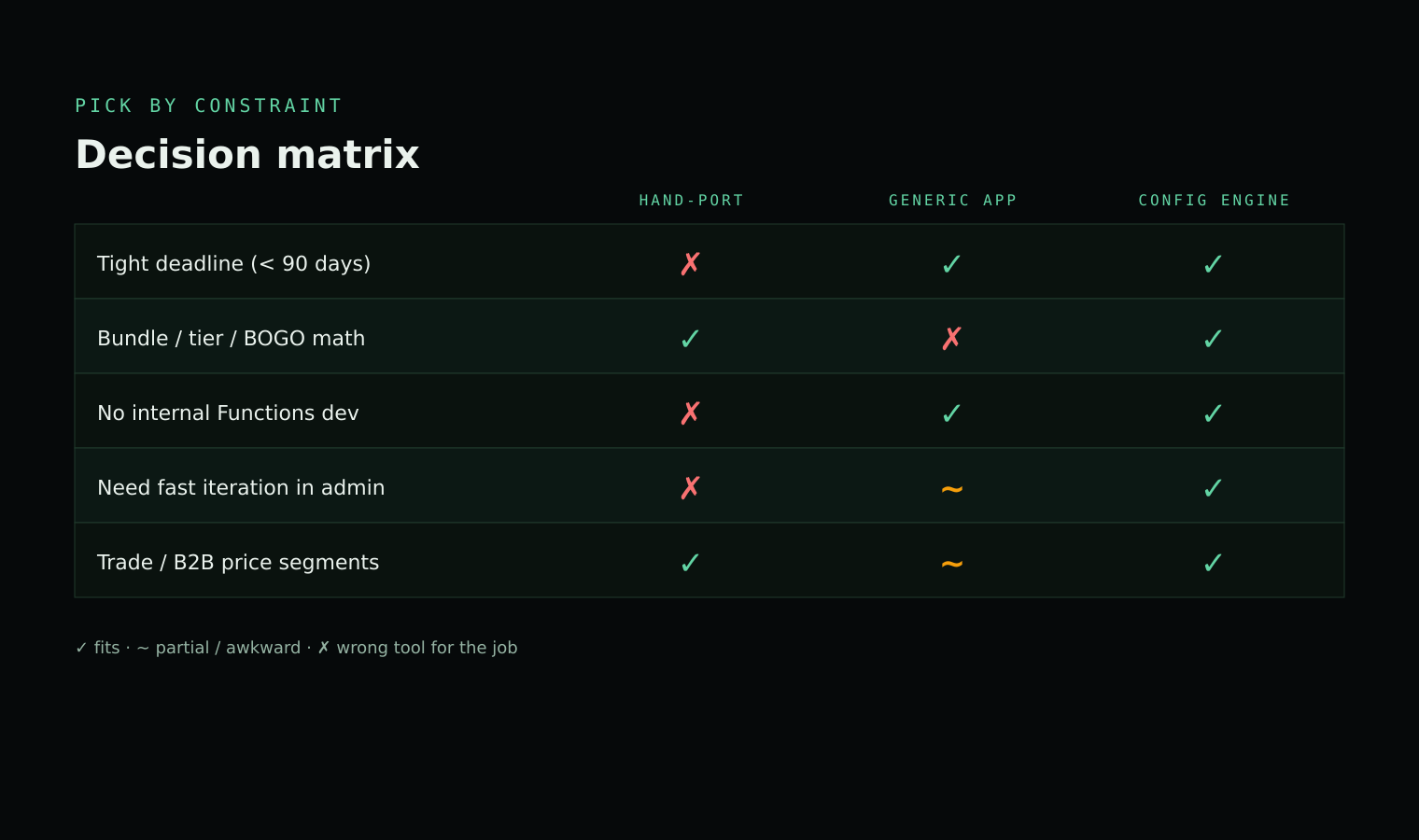
The matrix is intentionally biased toward Option C in the bottom rows. If you do not have Functions experience in-house and the deadline is real, the engine is the only option that does not require hiring.
Migration playbook
Five steps. Order matters. Each step gates the next.
- Inventory. Open Shopify Admin → Apps → Script Editor and export every active script. Record what each one does in plain English and which products or customers it targets. The output is a spreadsheet, one row per script.
- Classify by handler type. Group each script by underlying mechanic: tier, bundle, split bundle, trade, BOGO, or shipping rule. This decides which replacement option fits and exposes scripts that overlap or contradict each other.
- Map to target. For each group, pick the replacement path: hand-port simple shipping rules; use a generic app for standard codes; use the engine for bundle, tier, and trade. A single store can mix all three — the choices are per-rule, not per-store.
- Parallel-run in a development store. Clone production into a dev store, install the replacement, recreate the rules. Run a synthetic checkout for every customer segment and product combination the original scripts cover. Diff the cart totals against production. Fix until they match.
- Cut over progressively. Migrate one discount at a time in production. Disable the corresponding Script Editor entry on cutover (do not delete — disabling is reversible). Watch order logs for one full sale cycle before moving to the next discount. Keep all Scripts disabled until the sunset date as a rollback path.
Sources & further reading
- About Shopify Functions — Shopify Developer Docs (2026). Overview of the Functions runtime, language options, and where Functions sit in the platform.
- Migrating from Shopify Scripts to Shopify Functions — Shopify Developer Docs (2026). The official migration guide that maps each Scripts type to the corresponding Discount API or Cart Transform API choice.
- Discount Function API — Shopify Developer Docs (2026). Reference for the unified Discount API across product, order, and shipping discount classes.
- Cart Transform Function API — Shopify Developer Docs (2026). Reference for the bundling, expand, and line-item-pricing transforms — the surface for line-item bundle replacements.
shopify app deploycommand reference — Shopify Developer Docs (2026). Documents the CLI command that creates an app version and ships Functions and other extensions.- Shopify Functions now supports up to 25 active functions per Function API — Shopify Developer Changelog (2025). Sets the activation cap that constrains how many discount Functions you can stack on a single Function API.
- Shopify Scripts will be deprecated on June 30, 2026 — Shopify Developer Changelog (2026). The canonical sunset announcement that defines the migration deadline this post is built around.
- Combining discounts — Shopify Help Center (2026). Explains the per-class combinability flags that Functions discounts inherit from the native discount model.
FAQ
Can I keep my existing Script Editor rules running while I migrate?
Yes. Until June 30, 2026 Scripts and Functions coexist on the same store. The recommended pattern is to build the replacement on a development store, validate one discount in production for a full sale cycle, then progressively cut over the rest with the option to roll back to Scripts at any point.
Does Discount Engine work at point of sale (POS)?
Yes. Discount Engine targets both online checkout and POS through the same Shopify Functions runtime, so a tier or bundle rule configured once applies to in-store sales as well as web orders. Trade discounts can be gated on customer attributes from either channel.
Will my Functions-based discounts combine with native automatic discounts?
Combinability is configured per discount in the Shopify admin. A Functions discount can be marked combinable with order, product, and shipping discounts, the same way a native automatic discount is — see Shopify's combining-discounts guide for the per-class rules. Discount Engine surfaces these flags in its config UI so you do not need to manage them in raw code.
How does this work with checkout extensibility?
Shopify Functions is the official discount engine for the new Checkout Extensibility platform — it is the same runtime that powers all native checkout customisation going forward. Anything you migrate from Scripts to a Function will continue to work as Shopify ships further checkout changes.
What is the realistic effort to hand-port a script to Functions?
A simple percent-off line-item script is one to two developer days, including the Shopify CLI setup, deployment pipeline, and a basic test. A complex bundle or tiered script with shared quantity pools is one to three weeks of dev time, plus QA. Most Plus stores have between three and a dozen active scripts.
Can I see the engine before requesting access?
Yes. The full configuration reference for every supported discount type lives at /docs, including bundle, tier, special bundle, and trade discounts with worked examples and the exact admin UI fields. Read the docs first, then email team@devkind.com.au for a custom install link to your store.
Read next
See it in the docs
access
Custom distribution. Assisted install.
Shopify Discount Engine is distributed directly — not via the public App Store. Email for access and we'll walk through the engine and install it on your store.
$ email hassan.jsx@gmail.com \\
    --subject "discount-engine access" \\
    --store your-store.myshopify.com
› custom install link provided for your shop
› onboarding covers configuration and go-live