Blog
Shopify Scripts Sunset: What Merchants Need to Know Before June 30, 2026
Shopify is retiring the Script Editor and the entire Scripts platform on June 30, 2026. If you are a Shopify Plus merchant running line-item, payment, or shipping scripts, this guide is the orientation you need.
·9 min read
TL;DR. On June 30, 2026, Shopify removes the Script Editor and stops running every script written for the Scripts platform. The change is Plus-only. Cart-line discounts, payment-method gating, and shipping-method gating all stop working unless you migrate them to Shopify Functions. You have three real options: hand-port to Functions, switch to a generic discount app, or use a config-driven engine. Start the migration now — the back half of the runway will be crowded.
What is happening
Shopify is retiring the Scripts platform — the Ruby sandbox that has powered checkout-time customisation for Plus merchants since 2016. The Script Editor app, line-item scripts, payment-gateway scripts, and shipping-rate scripts all stop running on June 30, 2026. After that date, any logic that previously lived in your Script Editor is gone. The carts go through Shopify's default behaviour as if the scripts had never existed.
This is the official replacement of an older runtime with a new one. Shopify Functions is built on WebAssembly, compiles from Rust or JavaScript, ships through the Shopify CLI, and is supported on every Shopify plan rather than just Plus. The migration is not optional and the date is not provisional — Shopify's Script Editor help page is the canonical source for the deprecation timeline.
Who is affected
You are affected if your Shopify Plus store runs even one script in the Script Editor today. That includes:
- Line-item scripts that change cart prices, apply tiered discounts, or build bundle pricing.
- Payment-gateway scripts that hide or surface payment methods based on the cart.
- Shipping-rate scripts that hide or rewrite shipping options.
- Any third-party app that has shipped a script into your store on your behalf — the Script Editor lists everything.
If you are not on Shopify Plus, you do not have access to the Script Editor and never did; nothing changes for you. If you are on Plus but only use the native Discounts admin (automatic discounts and discount codes), nothing changes either — those are not scripts.
Self-check in 60 seconds. Open Shopify Admin → Apps → Script Editor. If you see anything in the list with a green "Active" badge, you have work to do.
What breaks on day one
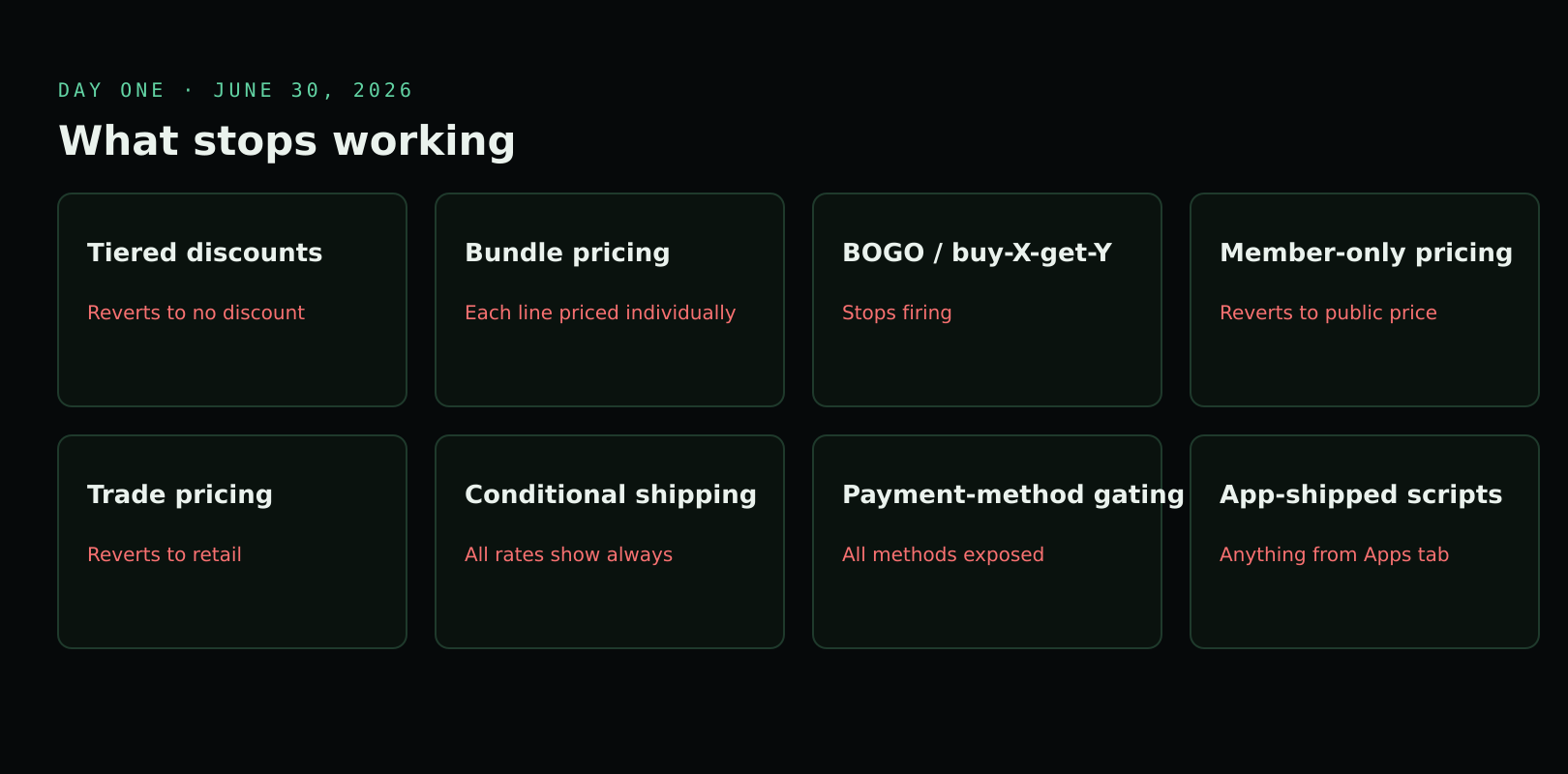
The breakage is loud and silent at the same time. Customers do not see an error; they see the wrong price. By discount type:
- Tiered discounts ("buy 3, save 10%; buy 6, save 20%") revert to no discount.
- Bundle pricing ("buy mattress + base for a combined price") falls apart — each line item is priced individually.
- BOGO and buy-X-get-Y offers stop firing.
- Member-only pricing based on customer tags reverts to the public price.
- Trade pricing based on B2B customer attributes reverts to retail.
- Cart-level conditional shipping rules stop applying — every shipping rate appears regardless of cart contents.
- Payment-method gating (e.g. hiding Afterpay above a basket threshold) stops applying.
The orders still complete. They just complete at the wrong price, with the wrong shipping, and through the wrong payment methods. Detection requires reading the order log; the customer-facing UI never complains.
Why Shopify is doing this
Scripts was built for a different era of Shopify. It runs Ruby in a sandbox, has no version control, no testing harness, no developer tooling, and no extension model — every script is a free-form file in the admin. Functions is the modern runtime: WebAssembly, Rust or JavaScript source, deployed through the Shopify CLI, version-controlled in a real repo, testable, and available across every Shopify plan rather than just Plus.
The product story is "we are unifying customisation across the platform." The operational story is "we want a runtime we can actually maintain." Both are true. Either way, the runway is fixed.
For merchants the practical effect is simpler than the runtime story suggests: a Function deploys like an app, version-controls like code, and runs in production with predictable per-checkout latency. The Script Editor's freeform-file workflow had no equivalent of git diff and no rollback — a typo could break checkout for every customer and the only audit trail lived in the Shopify Admin. Functions inherits the App Store submission and review pipeline, which is friction at install time but a safety net for change management. That trade — slower to ship, harder to break — is the change underneath the deprecation.
Your three options
There is no fourth. Every Plus merchant ends up at one of these:
| Option | What it means | When it fits |
|---|---|---|
| Hand-port to Functions | A developer rewrites each script as a Shopify Function in JS or Rust, deploys it through the CLI. | One or two simple scripts, in-house dev capacity, no urgency. |
| Generic discount app | Subscribe to a discount app from the Shopify App Store and rebuild the rules in the app's UI. | Standard percent-off, code, or BOGO needs. Not a fit for bundle math, multi-target groups, or trade pricing. |
| Config-driven engine | A Functions-based engine where the rules are JSON config in Shopify Admin instead of code. | Complex bundle, tier, or trade rules; tight deadline; no internal Functions expertise. |
We compare the three in detail in How to Replace Shopify Scripts Without Rewriting Your Discount Logic.
Migration timeline
Treat the deadline as immovable and work backwards. The further you compress the runway, the more you spend on labour you could have avoided.
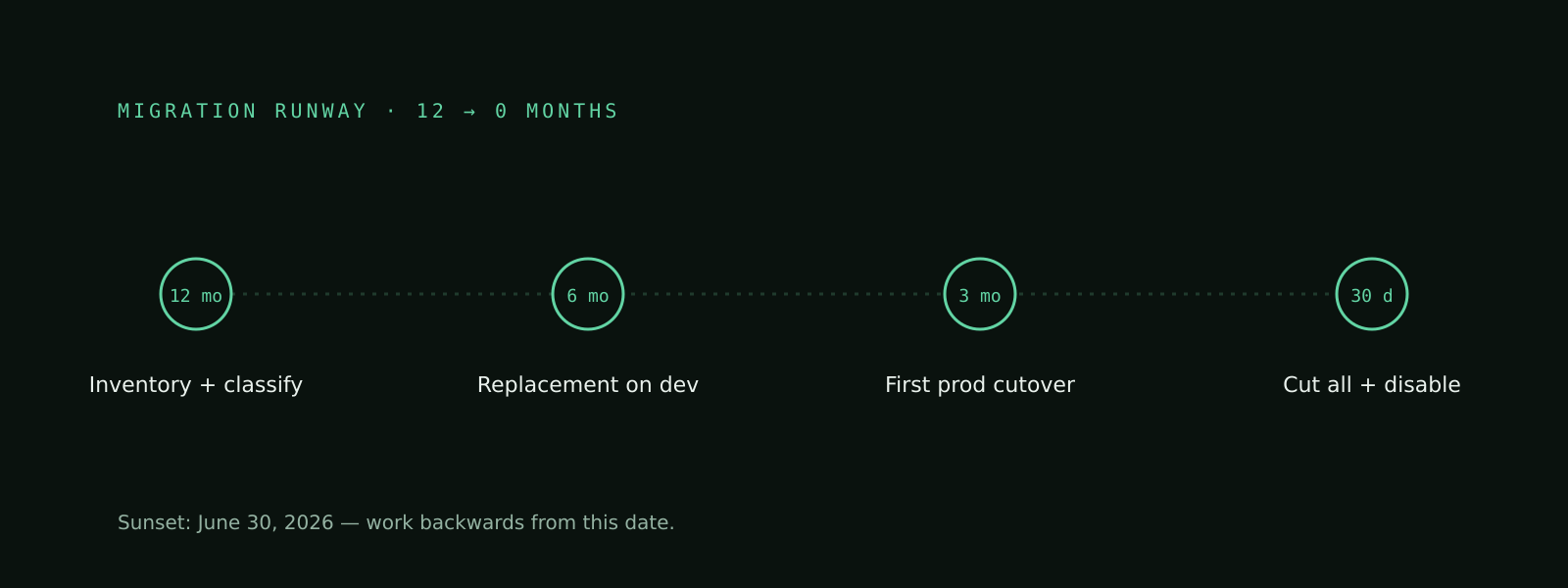
- 12 months out (June 2025). Inventory every active script. Classify by handler type (line-item, payment, shipping). Identify which third-party apps depend on Scripts. Pick a replacement path.
- 6 months out (January 2026). Replacement built and running on a development store. Internal stakeholders walked through the new admin surface. Rollback plan documented.
- 3 months out (April 2026). First production discount migrated. One full sale cycle observed. Revenue and discount-application metrics compared against the previous month's Scripts-era baseline.
- 30 days out (June 2026). All discounts cut over. Script Editor scripts disabled (not deleted) for one week before the sunset to confirm no traffic depends on them. Final removal on or before June 30.
Sources & further reading
- Shopify Scripts will be deprecated on June 30, 2026 — Shopify Developer Changelog (2026). The canonical engineering announcement of the sunset date and execution cut-off.
- Shopify Scripts can no longer be edited or published starting April 15, 2026 — Shopify Changelog (2026). Confirms the editing/publishing freeze that lands ten weeks before the runtime sunset.
- Migrating from Shopify Scripts to Shopify Functions — Shopify Developer Docs (2026). Step-by-step migration guide covering parallel-run patterns and the Cart Transform vs. Discount API choice.
- About Shopify Functions — Shopify Developer Docs (2026). Overview of the Functions runtime, WebAssembly compilation, and the Rust/JavaScript language options.
- Discount Function API — Shopify Developer Docs (2026). Reference for the unified Discount API spanning product, order, and shipping discount classes.
- Cart Transform Function API — Shopify Developer Docs (2026). Reference for bundle, expand, and line-item-pricing transforms — the replacement surface for line-item Scripts that built bundles.
- Plus merchants can now start building with Shopify Functions — Shopify Developer Changelog (2022). The original Plus rollout announcement that established Functions as the long-term replacement for Scripts.
FAQ
When exactly do Shopify Scripts stop working?
Shopify Scripts run their last cart on June 30, 2026. After that date the Script Editor is removed and any active scripts stop executing — every checkout falls back to Shopify's default discount and shipping behaviour, regardless of what your scripts used to do.
Is this only for Shopify Plus stores?
Yes. Shopify Scripts and the Script Editor have always been Plus-only features. Non-Plus stores were never able to use them, so the sunset only affects Plus merchants. The replacement platform — Shopify Functions — is available across all plans, but Plus merchants are the ones forced to migrate.
Will my existing scripts keep running until June 30, 2026?
Yes. Shopify has confirmed scripts will continue executing as normal until the sunset date, though editing and publishing new scripts stops on April 15, 2026. The risk is operational, not technical: leaving migration to the final months means competing with every other Plus merchant for Functions developers, app vendors, and your own internal review cycles.
Do I need a developer to migrate?
Whether you need a developer depends on your replacement path. Hand-porting scripts to Shopify Functions requires JavaScript or Rust, the Shopify CLI, and Cart Transform vs. Discount API design choices. Generic discount apps and config-driven engines like Discount Engine remove the code requirement and can be configured by any operator.
Are Shopify Functions free to use?
The Functions runtime itself is included with every Shopify plan at no extra charge. Costs come from whatever you build on top: agency fees if you commission custom Functions, app subscriptions if you choose a discount app, or installation fees for a managed engine. The platform is free; the implementation is not.
What happens to discounts created in the Discounts admin (not Script Editor)?
Nothing. Native automatic and code-based discounts created in Shopify's Discounts admin are unaffected by the Scripts sunset. Only logic written in the Script Editor — line-item, payment, and shipping scripts — stops working on June 30, 2026. If your team uses both surfaces, only the Script Editor portion needs migration; the Discounts admin layer keeps working unchanged before, during, and after the sunset.
Can I run Scripts and Functions in parallel during migration?
Yes. Until the sunset date, Scripts and Functions can coexist on the same store. This is the recommended migration pattern: build and validate the Functions-based replacement on a development store, switch a single discount over in production, observe one full sale cycle, then cut the rest.
Read next
access
Custom distribution. Assisted install.
Shopify Discount Engine is distributed directly — not via the public App Store. Email for access and we'll walk through the engine and install it on your store.
$ email hassan.jsx@gmail.com \\
    --subject "discount-engine access" \\
    --store your-store.myshopify.com
› custom install link provided for your shop
› onboarding covers configuration and go-live