- Best for
- Buy X, get Y discounted promotions
- Discount types
- Percentage, Fixed Amount
- Platforms
- Checkout, POS, or both
- Code required?
- Yes — automatic
Bundle Discount
Overview
Bundle Discount creates "Buy X, get Y discounted" promotions. When a customer has both the source (trigger) products and target (discounted) products in their cart, the discount is applied to the target items. Source items display the bundle message but are not discounted.
You can configure multiple bundles within a single discount instance, control how many target items receive the discount based on source quantity, and enforce strict set-based ratios.
Configuration Reference
Top-Level Fields
| UI Label | Type | Required | Default | Description |
|---|---|---|---|---|
| Discount Mode | string | Yes | — | Set to Bundle Discount |
| Platform | string | No | Both - POS & Checkout | Both - POS & Checkout, POS Only, or Checkout Only |
Multiple bundles can be added via the Add Bundle button.
Bundle Configuration (each bundle card)
| UI Label | Type | Required | Default | Description |
|---|---|---|---|---|
| Discount Type | string | No | Percentage | Percentage or Fixed Amount |
| Discount Percentage / Amount | number | Yes | — | The discount value |
| Apply Discount To | string | No | Price | Price or RRP (Compare At Price) |
| Discount Selection Strategy | string | No | All | All, First, or Maximum |
| Message | string | No | "" | Message shown at checkout on source and target items |
| Source Selector | string | No | Variant ID | Variant ID (select specific variants) or Product ID (select whole products) |
| Add Source Variants / Products | picker | Yes | — | The trigger products for the bundle |
| Target Selector | string | No | Variant ID | Variant ID or Product ID |
| Add Target Variants / Products | picker | Yes | — | The products that receive the discount |
| Minimum quantity | number | No | 0 | Gates source and targets: see Minimum Quantity — total target qty ≥ this value (and source line ≥ this value) when above 0 |
| Limit By Source | checkbox | No | off | Limit discounted target qty based on source qty |
| Target per source (ratio) | number | No | 1 | How many targets get discounted per source set |
| Fixed ratios | checkbox | No | off | Require exact multiples on the target side |
| Max target qty | number | No | — | Hard cap on discounted targets (only when Fixed ratios is on) |
| Shared pool | checkbox | No | on | Whether the discount pool is shared across target lines |
How It Works at Checkout
- Target items show the discount message with the value, e.g. "Bundle Deal 20% OFF"
- Source items show only the message, e.g. "Bundle Deal" — no discount is applied to them
- Both source and target products must be in the cart for the bundle to activate
- Minimum quantity (when above 0): At least one source line must meet the threshold and the sum of all target quantities must be greater than or equal to the same minimum, or the bundle does not run
How does minimum quantity work for bundle discounts?
Minimum quantity gates the bundle on both the source and target sides — both conditions must be satisfied or the discount does not activate. The same threshold value (m) applies to each side.
The Minimum quantity field (m) gates the bundle in two ways. Both must be satisfied for the discount to activate:
- Source: At least one source cart line has quantity ≥ m
- Target: Total target quantity across all target cart lines is ≥ m
In short: target quantity (total) ≥ minimum quantity, and source quantity (on at least one line) ≥ minimum quantity, using the same value m. With the default m = 0, these checks do not block the bundle (any positive target quantity satisfies "≥ 0").
The same m is used elsewhere in this doc (for example in the Limit By Source formula when that mode is on).
How many target items get discounted with Limit By Source?
Limit By Source caps the number of discounted target items based on how many source items are in the cart. The cap is calculated using the formula floor(source_qty / minimum_quantity) * target_per_source — for example, 4 source items with a minimum of 2 and a ratio of 2 yields 4 discounted targets.
When Limit By Source is enabled, the number of discounted target items is limited by the source quantity.
How it works: For every set of source items (based on Minimum quantity), the number of targets specified in Target per source (ratio) receive the discount.
Formula (source-side cap): Let source_qty = total quantity of source items in the cart, m = Minimum quantity, and r = Target per source (ratio). The bundle only runs if total target quantity ≥ m (see Minimum Quantity). The maximum number of target units that can be discounted from the source side is then:
discounted_targets_cap = floor(source_qty / m) * r
The bundle never discounts more targets than this cap or than you have in the cart; any targets above the cap stay full price.
| Source Qty | Minimum quantity | Target per source | Discounted Targets |
|---|---|---|---|
| 2 | 1 | 1 | 2 |
| 4 | 2 | 2 | 4 |
| 3 | 2 | 1 | 1 |
| 6 | 2 | 3 | 9 |
What is the difference between Shared Pool on and off?
Shared pool determines whether target cart lines compete for the same discount allowance or receive independent allocations. When enabled (the default), one target line can consume the entire discount pool before the next line is evaluated — cart order matters. When disabled, each target line is evaluated independently against the source-side cap, so the discount can spread more evenly across different products.
When Limit By Source is enabled, Shared pool controls how the discount quantity pool (the maximum number of target units that can be discounted — from Limit By Source) is applied across target cart lines.
When enabled (default), the pool is shared across all target lines: Line A consumes from the pool first; Line B gets whatever remains. When disabled, each target line independently gets up to the max discounted quantity (the same cap, evaluated per line without one line spending the whole pool first).
| Shared pool | Summary |
|---|---|
| On (default) | One pool; earlier target lines use it first (Line A, then Line B from the remainder). |
| Off | Each target line can discount up to the max quantity on its own. |
Example: two target lines. Limit By Source is on with Minimum quantity 2 (beds) and Target per source (ratio) 1 (pillow). Cart: 4 beds → floor(4 / 2) * 1 = 2 discounted pillow units total (the pool). Targets are on separate cart lines: Line A — 2× Pillow Standard, Line B — 2× Pillow Firm.
- Shared pool on: Line A uses both units from the pool (both Standard pillows discounted); Line B gets nothing left — both Firm pillows stay full price. If Line B were first in the cart, it would take the pool instead. Order matters.
- Shared pool off: Each line can use up to the max discounted quantity on its own. Confirm how totals combine for multi-line carts in checkout or POS.
With only one target line, Shared pool does not change the outcome—use multiple target lines to see a difference.
Fixed Ratios
When Limit By Source is enabled and Fixed ratios is checked, target items must form complete sets of Target per source (ratio) to receive any discount.
Example: Target per source = 4, 1 source item
| Targets in Cart | Discounted |
|---|---|
| 4 | 4 |
| 5 | 4 (incomplete set of 1 excluded) |
| 3 | 0 (no complete set) |
| 8 | 4 (limited by source) |
Max Target Qty
A hard cap on how many target items can be discounted. Only available when both Limit By Source and Fixed ratios are enabled.
- The cap scales with source quantity. For example, with Max target qty set to 4:
- 1 qualifying source → up to 4 targets discounted
- 2 qualifying sources → up to 8 targets discounted
- Validation: Max target qty must be greater than both Minimum quantity and Target per source, or the bundle will not activate.
Examples
These walk from a basic bundle to setups that combine Limit By Source, Fixed ratios, Max target qty, Shared pool, and Minimum quantity together. Use the configuration reference for field defaults.
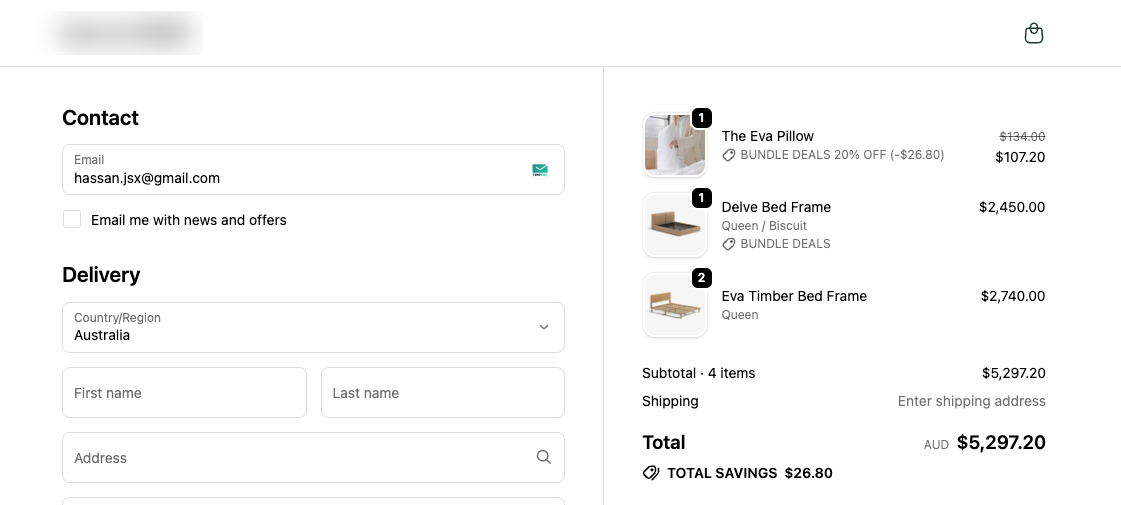
Example 1: Simple Bundle — Buy A, Get 20% off B
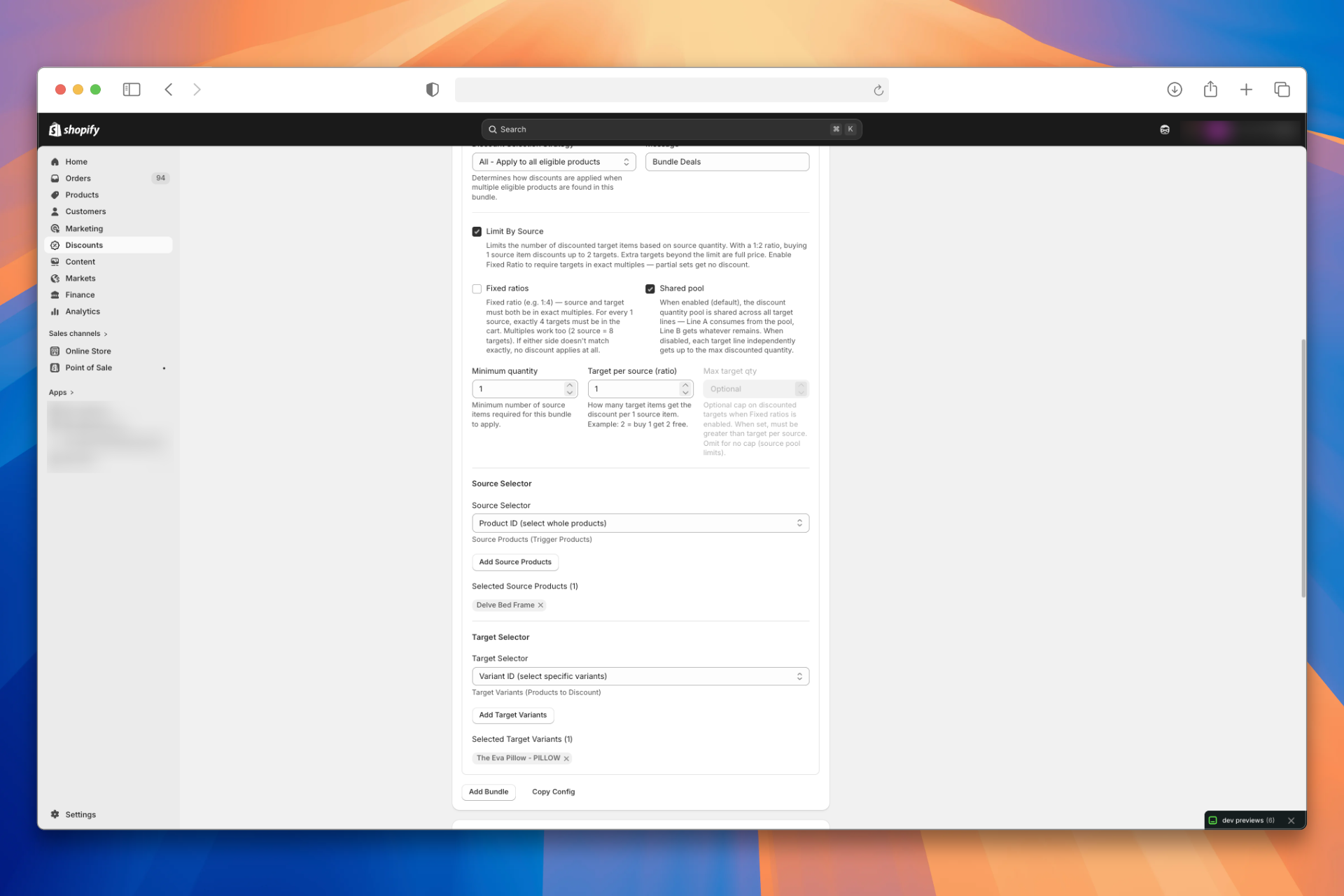
Setup: Minimum quantity is left at the default 0, so the target-total check does not require more than one target unit.
At checkout:
- Product A: Shows "Bundle Deal", no discount
- Product B: Shows "Bundle Deal 20% OFF", 20% deducted
Example 2: Limit By Source — Buy 1 Bed, Get upto 2 Pillow Half Price
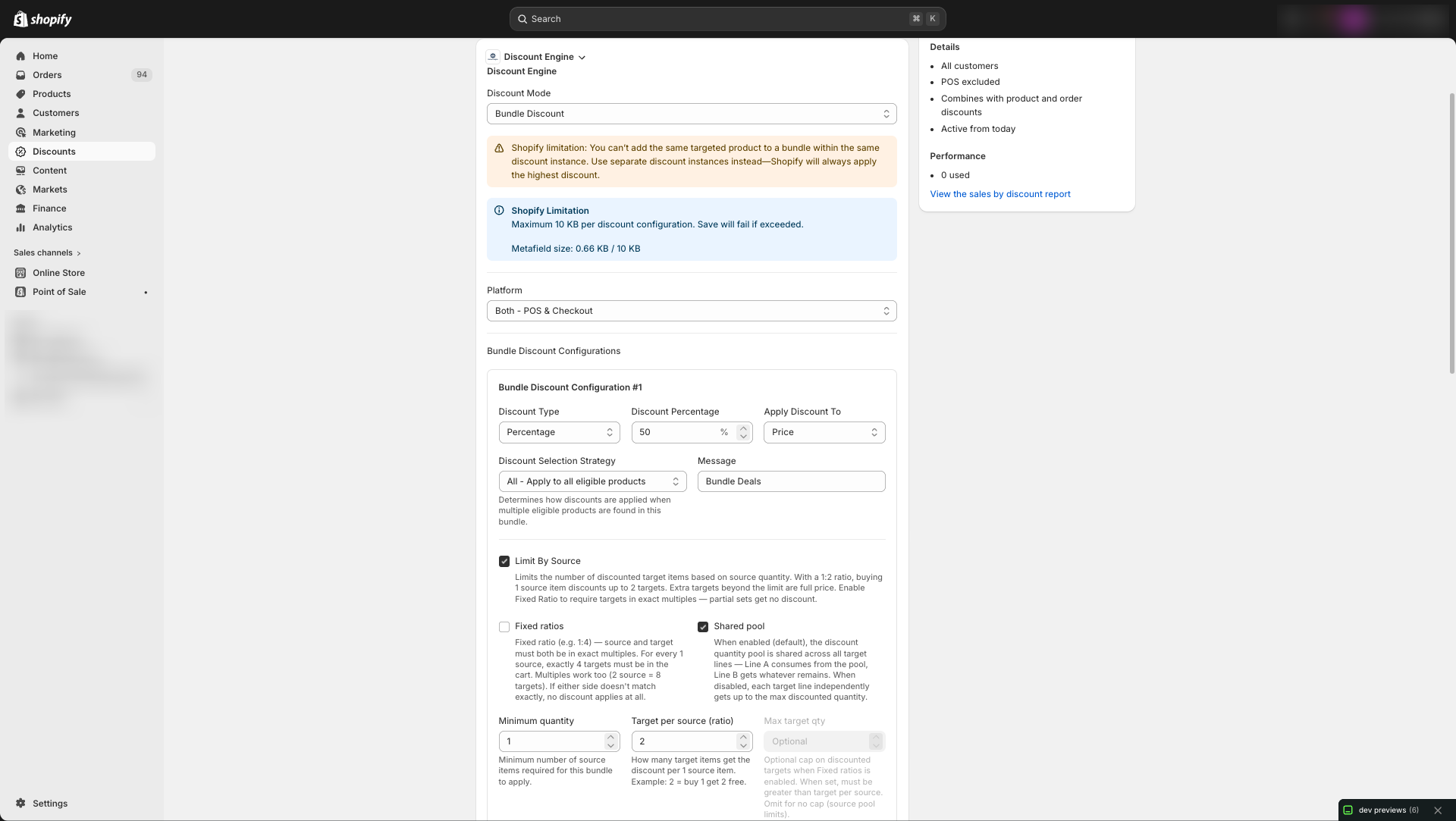
Setup: Limit By Source on, Minimum quantity 1, Target per source 2 (up to two pillow units discounted per source "set"; see Limit By Source). Total target quantity must be ≥ 1 (Minimum Quantity). Discounted pillow count is capped by the source-side formula and cart contents.
Unit prices (for the calculations below):
| Item | List price | With 50% bundle on pillow |
|---|---|---|
| Bed | $2,450 each | (beds are not discounted by this bundle) |
| Pillow | $134 each | $67 each when the line qualifies |
At checkout:
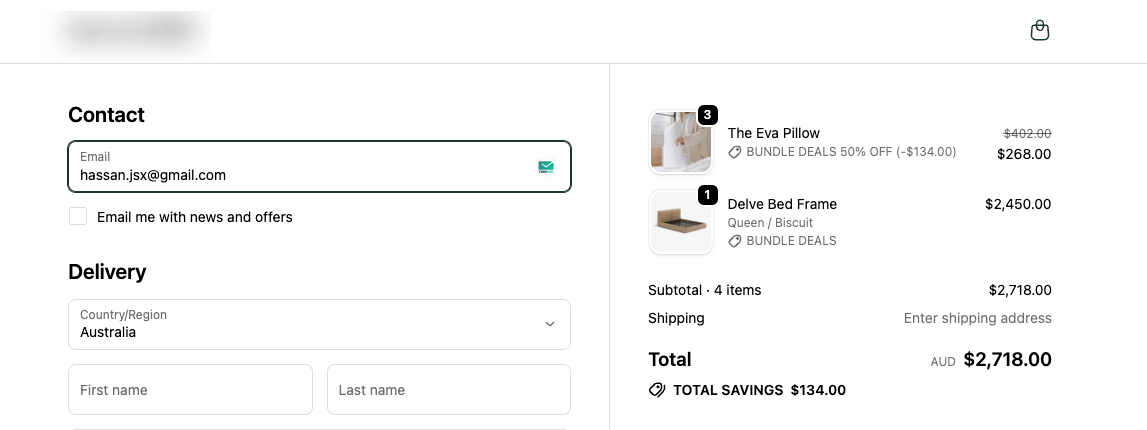
1 bed + 3 pillows — 2 pillows at 50% off, 1 pillow full price (Limit By Source caps how many get the deal).
| Line | Calculation | Amount |
|---|---|---|
| Beds | 1 × $2,450 | $2,450 |
| Pillows (50% off) | 2 × $67 = $134 | $134 |
| Pillow (full price) | 1 × $134 | $134 |
| Pillow subtotal | $134 + $134 | $268 |
| Cart total | $2,450 + $268 | $2,718 |
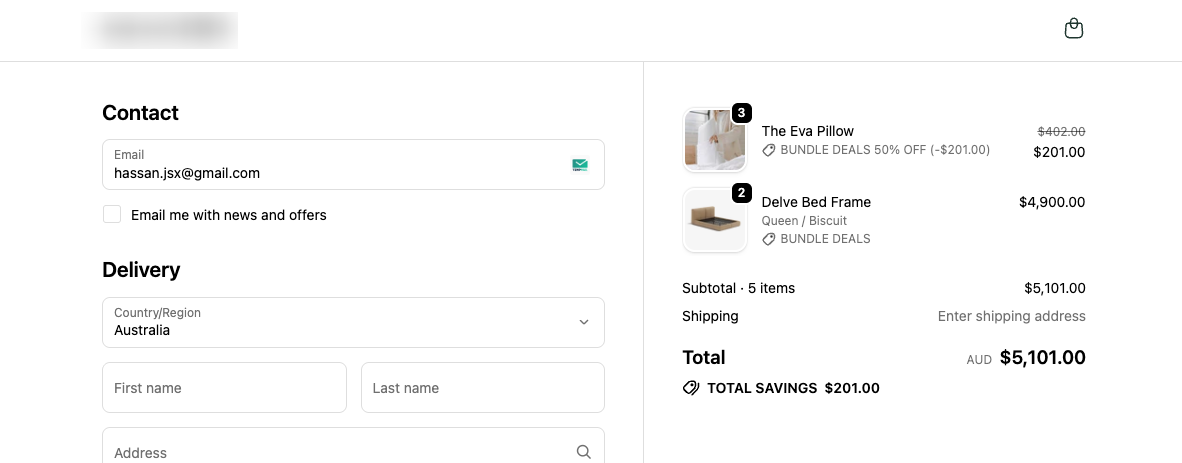
2 beds + 3 pillows — 3 pillows at 50% off.
Why all 3 pillows are discounted: With Minimum quantity 1 and Target per source 2, the source-side cap is floor(bed_qty ÷ 1) × 2 discounted pillow units. For 2 beds that is floor(2 ÷ 1) × 2 = 4 units. The cart only has 3 pillows, and 3 ≤ 4, so the allowance covers every pillow — none are left at full price.
| Line | Calculation | Amount |
|---|---|---|
| Beds | 2 × $2,450 = $4,900 | $4,900 |
| Pillows (50% off) | 3 × $67 = $201 | $201 |
| Cart total | $4,900 + $201 | $5,101 |
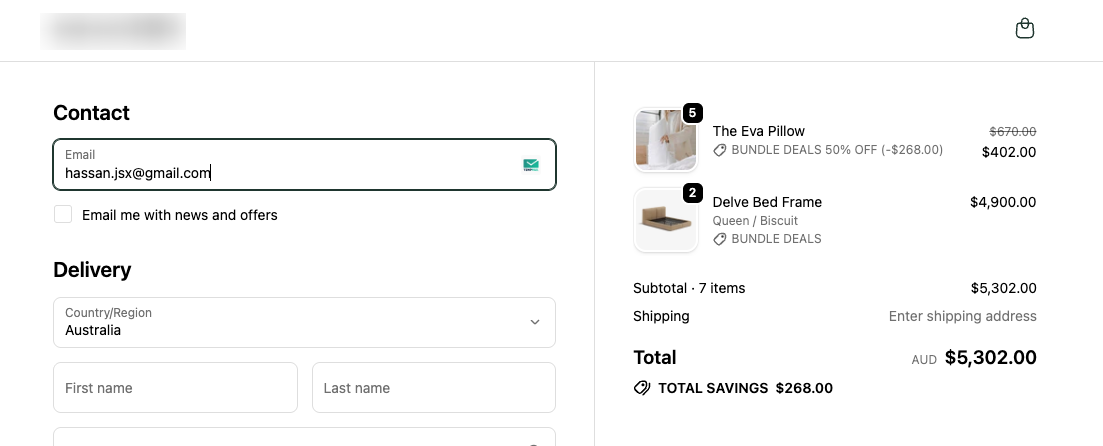
2 beds + 5 pillows — 4 pillows at 50% off, 1 full price.
| Line | Calculation | Amount |
|---|---|---|
| Beds | 2 × $2,450 = $4,900 | $4,900 |
| Pillows (50% off) | 4 × $67 = $268 | $268 |
| Pillow (full price) | 1 × $134 | $134 |
| Pillow subtotal | $268 + $134 | $402 |
| Cart total | $4,900 + $402 | $5,302 |
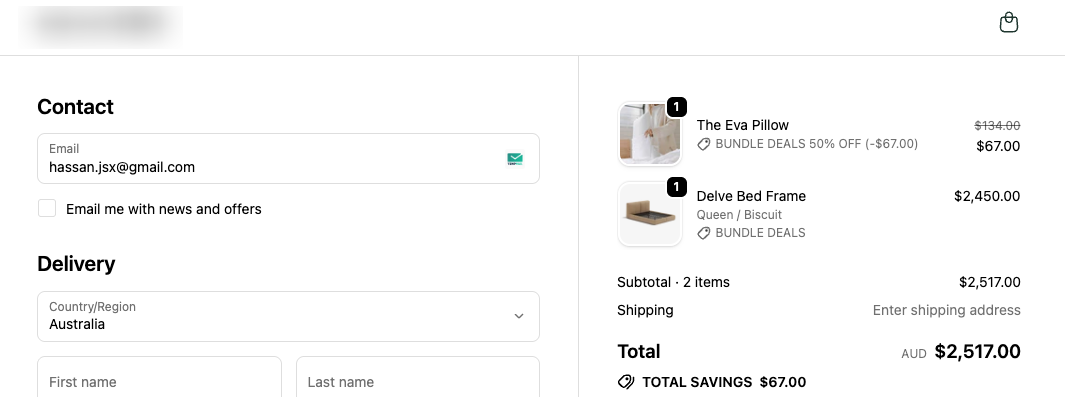
1 bed + 1 pillow — 50% OFF.
| Line | Calculation | Amount |
|---|---|---|
| Beds | 1 × $2,450 | $2,450 |
| Pillows (50% off) | 1 × $67 | $67 |
| Cart total | $2,450 + $67 | $2,517 |
Example 3: Fixed Ratios
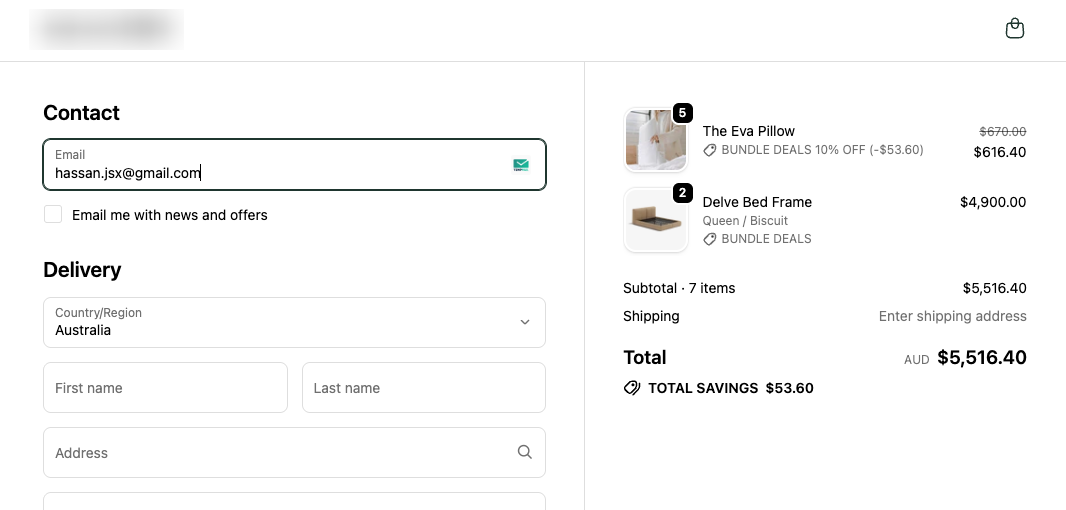
"Buy 1 Bed, get 2 pillows at 10% off."
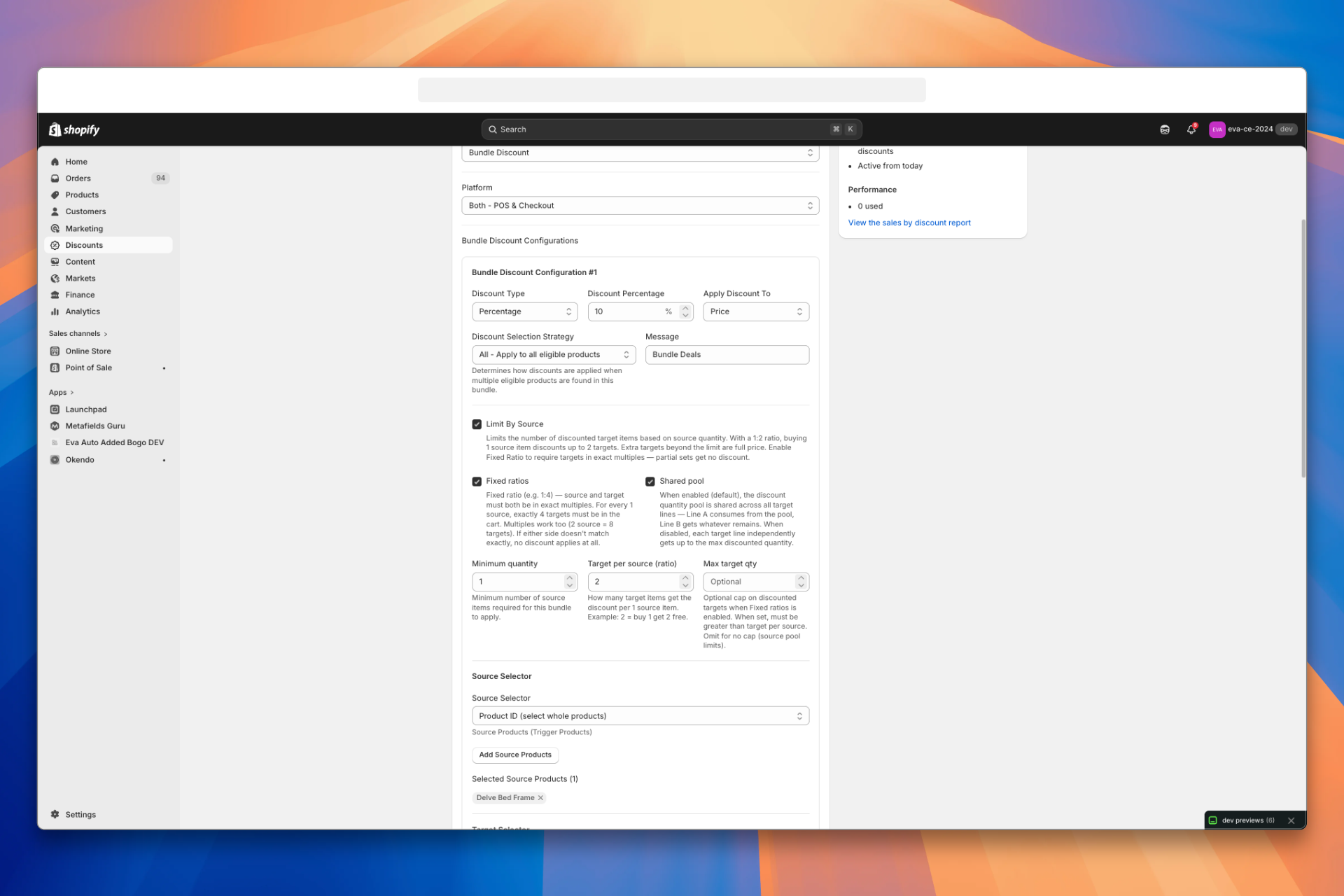
Setup: Limit By Source on, Fixed ratios on, Minimum quantity 1, Target per source 2 (pillows discount in complete pairs). Max target qty is not used here — only Fixed ratios and the source-side cap limit how many pillow units are discounted. For Max target qty with fixed ratios and multiple sources, see Example 5. Every cart below has total pillow quantity ≥ 1 (Minimum Quantity).
Unit prices (for the calculations below):
| Item | List price | With 10% bundle on eligible pillow lines |
|---|---|---|
| Bed | $2,450 each | (beds are not discounted by this bundle) |
| Pillow | $134 each | $120.60 each ($134 × 0.9) when the line qualifies |
At checkout: 1 bed + 2 pillows — 2 pillows at 10% off (one full pair).
| Line | Calculation | Amount |
|---|---|---|
| Beds | 1 × $2,450 | $2,450 |
| Pillows (10% off) | 2 × $120.60 = $241.20 | $241.20 |
| Cart total | $2,450 + $241.20 | $2,691.20 |
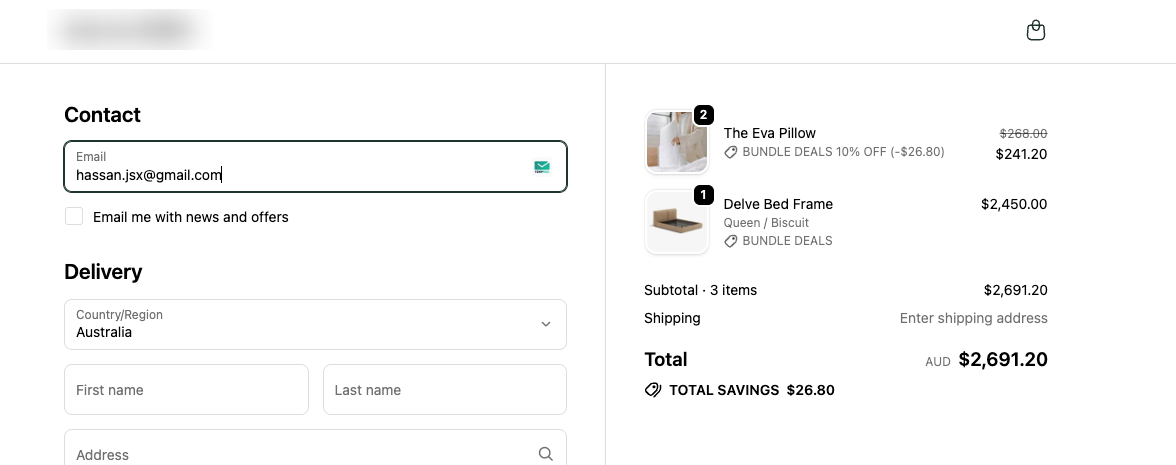
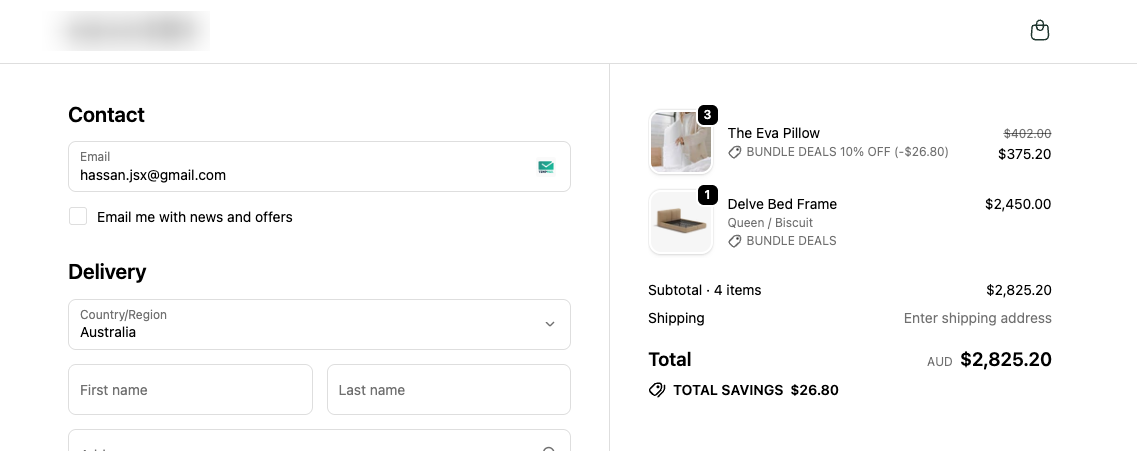
1 bed + 3 pillows — 2 pillows at 10% off, 1 pillow full price (one incomplete unit outside the pair).
| Line | Calculation | Amount |
|---|---|---|
| Beds | 1 × $2,450 | $2,450 |
| Pillows (10% off) | 2 × $120.60 = $241.20 | $241.20 |
| Pillow (full price) | 1 × $134 | $134 |
| Pillow subtotal | $241.20 + $134 | $375.20 |
| Cart total | $2,450 + $375.20 | $2,825.20 |
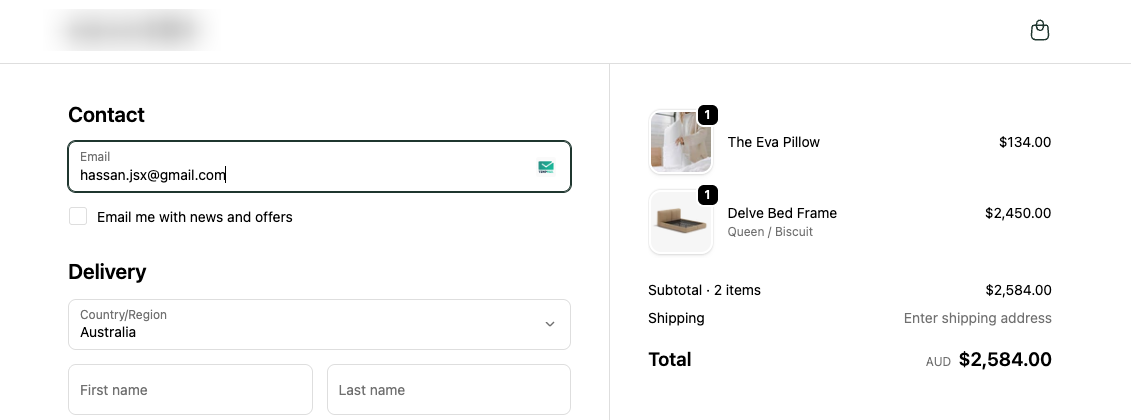
1 bed + 1 pillow — no pillow discount (no complete pair of 2).
| Line | Calculation | Amount |
|---|---|---|
| Beds | 1 × $2,450 | $2,450 |
| Pillows (no deal) | 1 × $134 | $134 |
| Cart total | $2,450 + $134 | $2,584 |
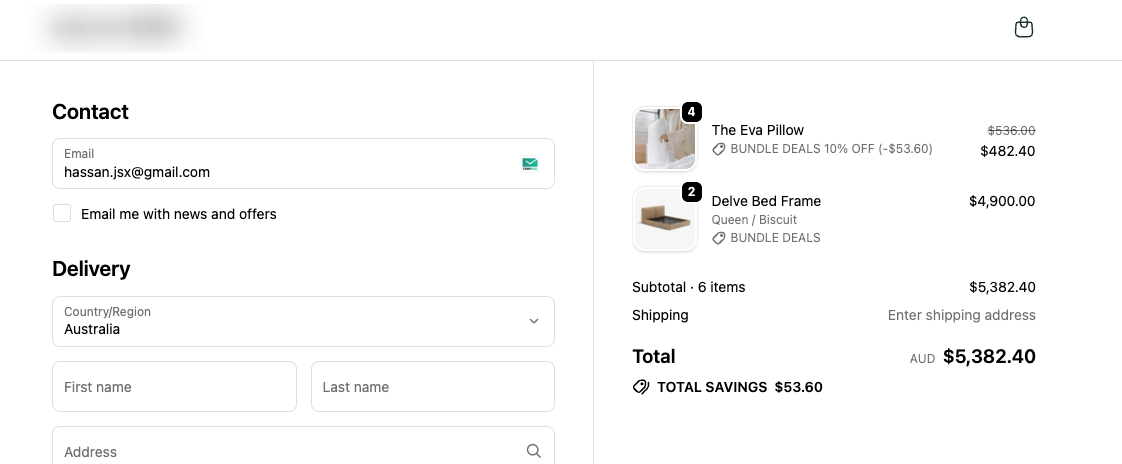
2 beds + 4 pillows — 4 pillows at 10% off (two pairs; within the source allowance).
| Line | Calculation | Amount |
|---|---|---|
| Beds | 2 × $2,450 = $4,900 | $4,900 |
| Pillows (10% off) | 4 × $120.60 = $482.40 | $482.40 |
| Cart total | $4,900 + $482.40 | $5,382.40 |
2 beds + 5 pillows — 4 pillows at 10% off, 1 pillow full price (source allowance caps discounted units at 4; the fifth stays full price).
| Line | Calculation | Amount |
|---|---|---|
| Beds | 2 × $2,450 = $4,900 | $4,900 |
| Pillows (10% off) | 4 × $120.60 = $482.40 | $482.40 |
| Pillow (full price) | 1 × $134 | $134 |
| Pillow subtotal | $482.40 + $134 | $616.40 |
| Cart total | $4,900 + $616.40 | $5,516.40 |
Example 4: Shared Pool — Bed, Pillow, and Storage Drawer
This example uses three product types from the same catalog as the examples above: bed (source), pillow, and storage drawer (targets). The cart below has four target units in total (2 pillows + 2 drawers) on two target lines.
Unit list prices (same bed and pillow figures as Example 3; add storage drawer at list price $189 each if your catalog uses a different number, swap it in the tables):
| Item | List price | With 10% bundle on eligible lines (targets only) |
|---|---|---|
| Bed | $2,450 each | (beds are not discounted by this bundle) |
| Pillow | $134 each | $120.60 each ($134 × 0.9) when discounted |
| Storage drawer | $189 each | $170.10 each ($189 × 0.9) when discounted |
Setup (both scenarios): Limit By Source on. Minimum quantity 1, Target per source 2 — i.e. 1:2 (one qualifying source "set" unlocks 2 discounted target units; see Limit By Source). Discount 10% on targets (same idea as Example 3). Cart: 1 bed, 2 pillows, 2 storage drawers. Target lines appear in this cart order: Line A — Pillow, then Line B — Storage drawer.
Source-side cap: floor(1 ÷ 1) × 2 = 2 discounted target units. Total target quantity is 4 (≥ 1), so Minimum Quantity is satisfied.
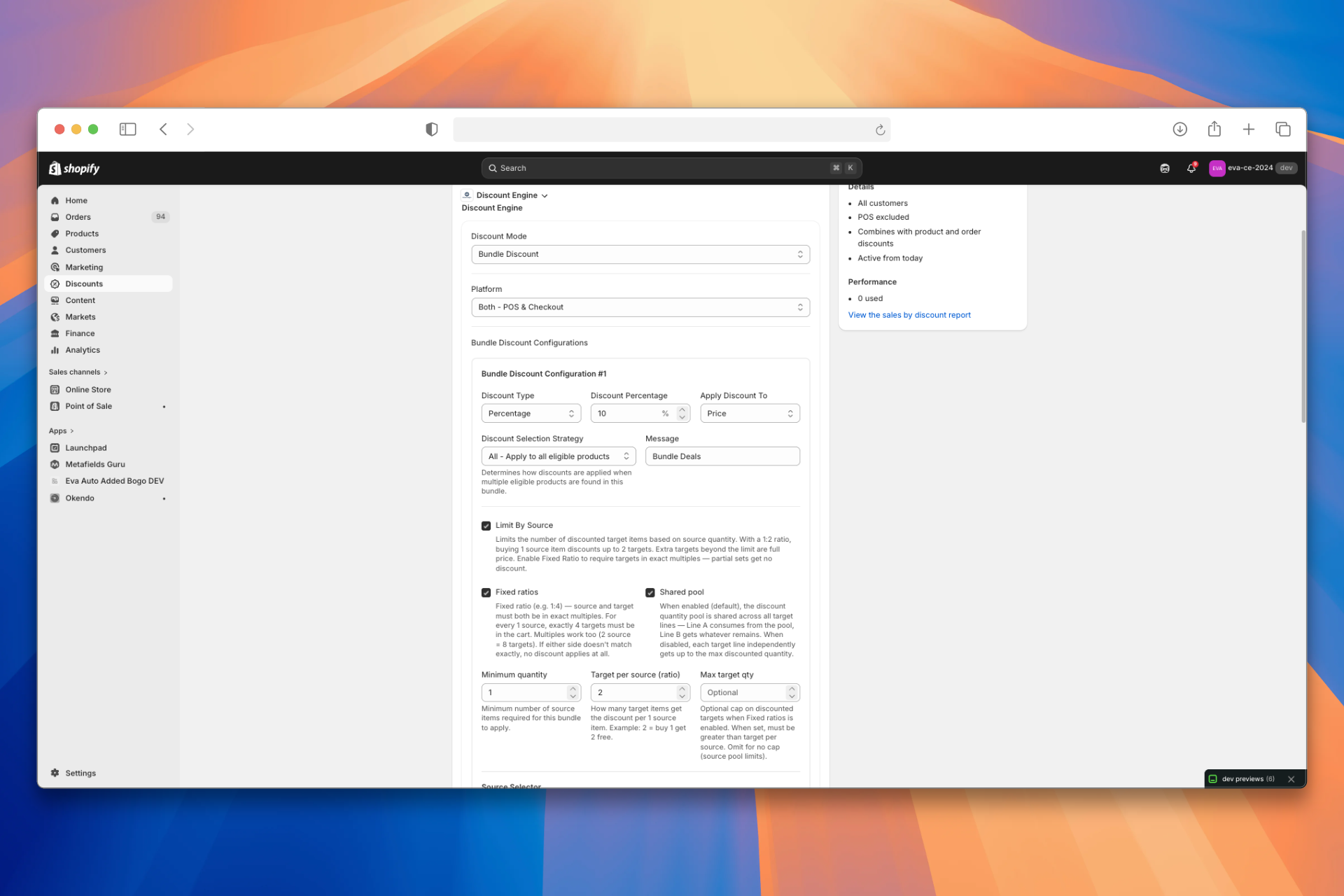
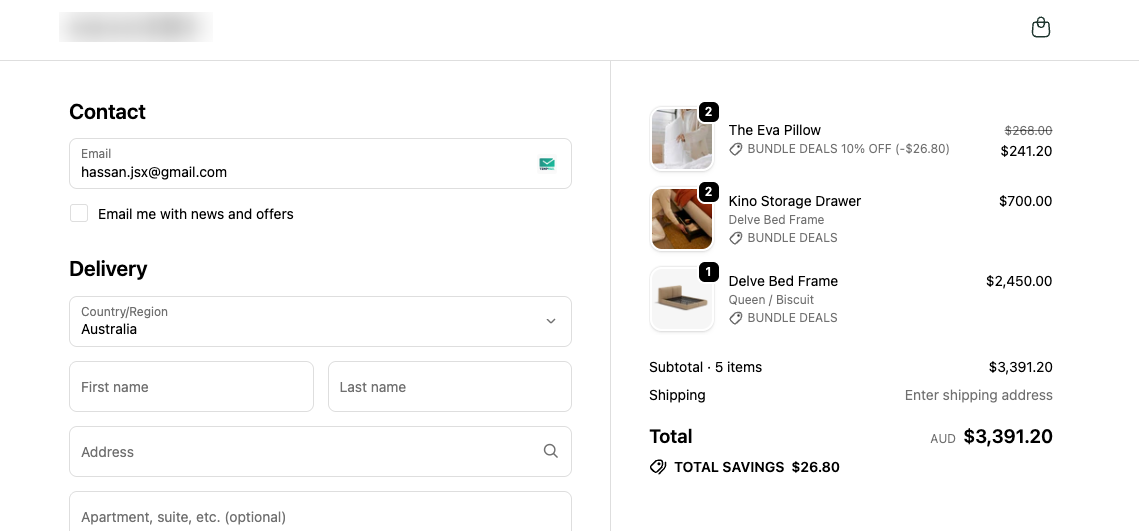
Shared pool on
One global pool of 2 units; Line A consumes first, then Line B gets the remainder (Shared pool).
| What happens | Detail |
|---|---|
| Pool | 2 units |
| Line A (2 pillows) | Uses both units → 2 pillows at $120.60 |
| Line B (2 drawers) | 0 units left → 2 drawers at full $189 |
At checkout (Shared pool on):
| Line | Calculation | Amount |
|---|---|---|
| Bed | 1 × $2,450 | $2,450 |
| Pillows (10% off) | 2 × $120.60 = $241.20 | $241.20 |
| Storage drawers (full price) | 2 × $350 = $700 | $700 |
| Cart total | $2,450 + $241.20 + $378 | $3,391.20 |
Shared pool off
Shared pool is off. The same 2-unit cap from Limit By Source still applies overall, but target lines are not merged into one sequential pool—each line is considered without the other line spending the allowance first (Shared pool). Exact allocation can vary by checkout; one common pattern is splitting the 2 discounted units across lines (1 pillow + 1 drawer at the bundle price, 1 pillow + 1 drawer at list price) instead of awarding both units to Line A.
Illustrative totals if 1 pillow and 1 drawer receive the 10% price:
| Line | Calculation | Amount |
|---|---|---|
| Bed | 1 × $2,450 | $2,450 |
| Pillow (10% off) | 2 × $120.60 | $241.20 |
| Storage drawer (10% off) | 2 × $315.10 | $630 |
| Cart total | $2,450 + $241.20 + $630 | $3,321.20 |
Confirm the live line-by-line allocation when Shared pool is off in your checkout or POS—if your engine still applies a strict global cap, totals will match that behavior.
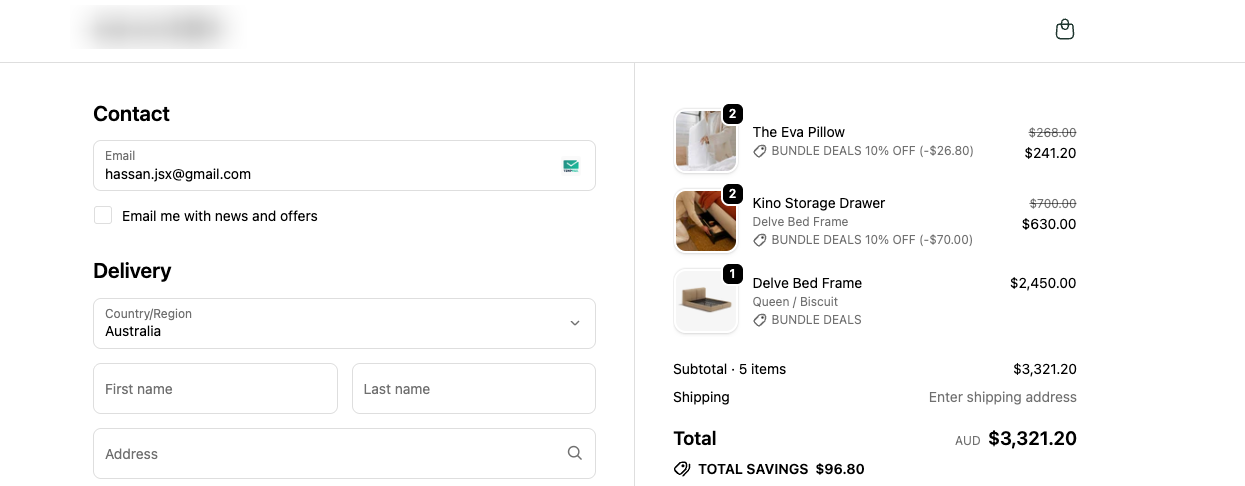
Compare: With Shared pool on and pillows first in the cart, both discounted units attach to pillows. With Shared pool off, you can get a different split across pillow and drawer lines instead of Line A taking the entire allowance—cart order can still matter for some engines when pool is on; when pool is off, behavior follows your app's rules for independent target lines.
Frequently Asked Questions
Are source items ever discounted in a Bundle Discount?
No. In a Bundle Discount, source items only display the bundle message (e.g. "Bundle Deal") but are never discounted. Only target items receive the discount. If you need discounts on both source and target products, use Split Bundle Discount instead.
Can I use the same product as both a source and a target?
No. A product should be assigned as either a source or a target within a bundle, not both. If you need a product to trigger a bundle and also be discounted, consider using a Tier Discount or Split Bundle Discount.
What happens if only source products are in the cart (no targets)?
The bundle does not activate. Both source and target products must be in the cart for any discount to apply. Source items will appear at full price with no bundle message.
Can I have multiple bundles in a single discount instance?
Yes. You can add multiple bundles using the Add Bundle button. Each bundle has its own source products, target products, and discount configuration. However, you cannot target the same product in two different bundles within the same discount instance.
What is the difference between "Limit By Source" and "Minimum quantity"?
Minimum quantity is a gate — it sets the threshold that both source and target quantities must meet before the bundle activates at all. Limit By Source is a cap — once the bundle activates, it limits how many target items get discounted based on how many source items are in the cart, using the formula floor(source_qty / minimum_quantity) × target_per_source.
Does Bundle Discount work on Shopify POS?
Yes. By default, the Platform setting is Both - POS & Checkout, so the bundle applies at both online checkout and POS. You can restrict it to POS Only or Checkout Only if needed.
What does "Fixed ratios" do and when should I use it?
When Fixed ratios is enabled (requires Limit By Source), target items must form complete sets of the Target per source ratio to receive any discount. Incomplete sets get no discount. Use this when your promotion requires exact quantities — for example, "Buy 1 bed, get exactly 2 pillows discounted" where 1 pillow alone should not qualify.
Notes
- No duplicate targets across bundles. You cannot target the same product in two different bundles within the same discount instance. Use separate discount instances instead — Shopify automatically applies the highest discount.
- Minimum quantity and targets: If Minimum quantity is greater than 0, total target quantity in the cart must be ≥ that value, not only the source side. See Minimum Quantity.
- Source items are never discounted. They only display the bundle message.
- Fixed ratios can prevent any discount. If the total target quantity doesn't form at least one complete set of the Target per source ratio, no targets are discounted.
- RRP (Compare At Price): When Apply Discount To is set to RRP (Compare At Price) but a product has no RRP set, the current selling price is used instead.