- Best for
- Independent discounts on source and target products
- Discount types
- Mix of percentage and fixed per group
- Platforms
- Checkout, POS, or both
- Code required?
- Yes — automatic
Split Bundle Discount
Overview
Split Bundle Discount applies separate discounts to both source and target products. Unlike a standard Bundle Discount where only target items are discounted, this mode lets you configure independent discount values and messages for each side — for example, "10% off the Delve bed frame, 20% off the Slideaway Timber Tray."
Each split bundle configuration supports multiple target groups, each with its own discount value, operator, and message. You can also control which target groups are selected using a selection strategy.
How does Split Bundle differ from Bundle Discount?
Split Bundle Discount lets you apply separate, independent discounts to both source and target products, while standard Bundle Discount only discounts the target side. Split Bundle also supports multiple target groups with different discount values, types, and messages — allowing complex promotions like "10% off the bed, 15% off the tray, $50 off the drawer" in a single discount instance.
| Feature | Bundle Discount | Split Bundle Discount |
|---|---|---|
| Source items discounted? | No — source shows message only | Yes — configurable percentage or fixed amount |
| Target groups | Single target set per bundle | Multiple independent target groups |
| Selection strategy scope | Targets only | Target groups only (source always discounted when value > 0) |
| Minimum quantity applies to | Source and target totals | Source only |
| Discount types per side | One type for all targets | Different type and value per source and per target group |
| Use case | "Buy A, get B discounted" | "10% off A, 20% off B, $50 off C" |
Configuration Reference
Top-Level Fields
| UI Label | Type | Required | Default | Description |
|---|---|---|---|---|
| Discount Mode | string | Yes | — | Set to Split Bundle Discount |
| Platform | string | No | Both - POS & Checkout | Both - POS & Checkout, POS Only, or Checkout Only |
Multiple split bundles can be added via the Add Split Discount button.
Split Bundle Configuration (each discount card)
Source Section
| UI Label | Type | Required | Default | Description |
|---|---|---|---|---|
| Source Discount Type | string | No | Percentage | Percentage or Fixed Amount |
| Source Percentage / Amount | number | No | 0 | Discount value for source items (0 = no source discount) |
| Source message | string | No | "" | Message shown on source items at checkout |
| Source Selector | string | No | Variant ID | Variant ID or Product ID |
| Add Source Variants / Products | picker | Yes | — | The trigger products |
Target Section
Multiple target groups can be added via the Add target button. Each target group has:
| UI Label | Type | Required | Default | Description |
|---|---|---|---|---|
| Target Discount Type | string | No | Percentage | Percentage or Fixed Amount |
| Target Percentage / Amount | number | Yes | — | Discount value for this target group |
| Target message | string | No | "" | Message shown on target items at checkout |
| Target Selector | string | No | Variant ID | Variant ID or Product ID |
| Add Target Variants / Products | picker | Yes | — | The products that receive the discount |
Shared Settings
| UI Label | Type | Required | Default | Description |
|---|---|---|---|---|
| Discount Selection Strategy | string | No | All | Controls which target groups are selected (see below) |
| Apply Discount To | string | No | Price | Price or RRP (Compare At Price) |
| Message | string | No | "" | General message for the discount |
| Minimum quantity | number | No | 0 | Minimum source quantity: see Minimum Quantity |
| Limit By Source | checkbox | No | off | Limit discounted target qty based on source qty |
| Target per source (ratio) | number | No | 1 | How many targets get discounted per source set |
| Fixed ratios | checkbox | No | off | Require exact multiples on the target side |
| Shared pool | checkbox | No | on | Whether the discount pool is shared across target lines |
Discount Selection Strategy
Controls which target groups receive the discount. Source items are always discounted regardless of strategy (when Source Percentage / Amount is above 0).
| Option | Behavior |
|---|---|
| All - Apply to all eligible products | All target groups with eligible items are discounted |
| First - Apply to first eligible product | Only the first target group (by config order) that has eligible items is discounted |
| Maximum - Apply to product with highest discount | Only the target group with the highest total discount amount is discounted |
How It Works at Checkout
- Source items show their own discount: e.g. "Main Item Deal 10% OFF"
- Target items show their own discount: e.g. "Bonus Item 20% OFF"
- Both source and at least one target product must be in the cart for the discount to activate
- If Source Percentage / Amount is
0, source items receive no discount (the target discount can still apply)
Minimum Quantity
For Split Bundle Discount, Minimum quantity applies to source items only. At least one source cart line must have quantity ≥ the minimum for the entire discount to activate. It does not require a minimum total target quantity (unlike Bundle Discount — Minimum Quantity).
When Limit By Source is also enabled, Minimum quantity works with Target per source (ratio) the same way as in Bundle Discount — Limit By Source: for every qualifying set of source quantity, up to r target units can be discounted, subject to caps and Fixed ratios.
Limit By Source, Fixed Ratios, and Shared Pool
These behave like Bundle Discount for the target side:
- Limit By Source — caps discounted targets from source quantity (formula and tables are the same idea; m is your Minimum quantity for source lines in this mode).
- Fixed ratios — target quantity must form complete sets of Target per source (ratio) before any target discount applies in that group.
- Shared pool — when on, one discount pool is consumed across target lines (and across target groups when applicable); when off, lines can be evaluated independently.
Confirm edge cases (multiple target groups, cart order) in checkout or POS on your store.
Examples
These walk from a simple split to multiple target groups. Use the configuration reference for field defaults.
All list prices below use this catalog:
| Product | List price |
|---|---|
| Slideaway Timber Tray | $95 |
| Delve bed frame | $2,450 |
| Kino Storage drawer | $350 |
Example 1: Simple Split — Both Source and Target Discounted
10% off the Delve bed frame, 20% off the Slideaway Timber Tray.
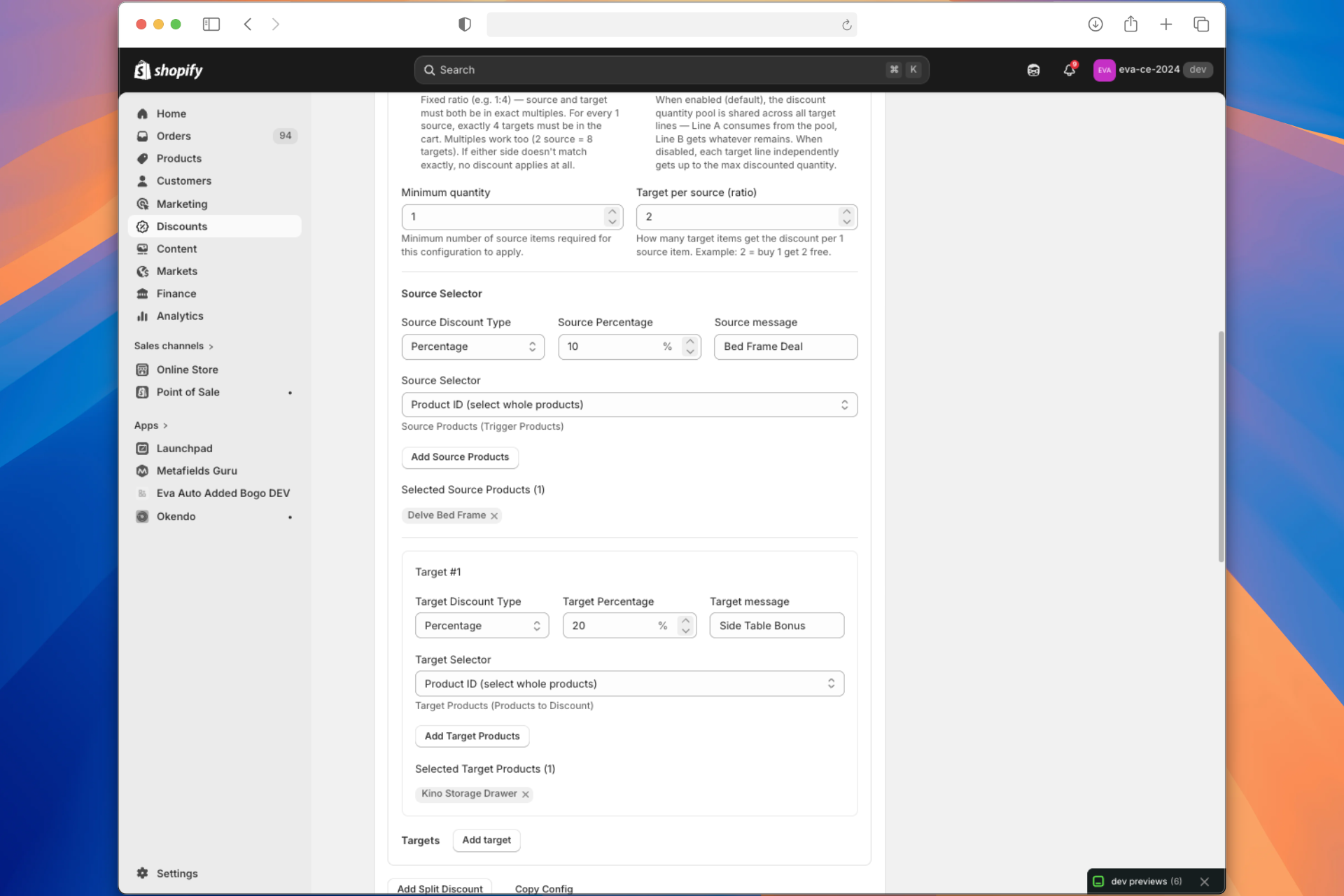
Setup: Minimum quantity default 0. One source line (Delve bed frame), one target group (Slideaway Timber Tray).
Unit prices (for the table below):
| Item | List price | With split discount |
|---|---|---|
| Delve bed frame | $2,450 | $2,205 each (10% off) |
| Slideaway Timber Tray | $95 | $76 each (20% off) when the line qualifies |
At checkout:
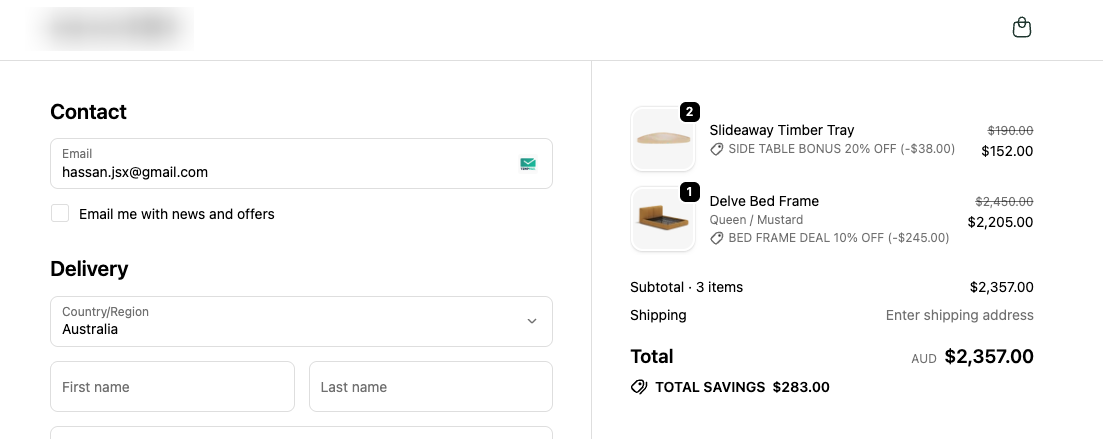
- Delve bed frame: Shows "Bed Frame Deal 10% OFF", 10% deducted from the bed line
- Slideaway Timber Tray: Shows "Side Table Bonus 20% OFF", 20% deducted from side table lines
1 bed frame + 2 side tables:
| Line | Calculation | Amount |
|---|---|---|
| Delve bed frame (10% off) | 1 × $2,205 | $2,205 |
| Slideaway Timber Trays (20% off) | 2 × $76 = $152 | $152 |
| Cart total | $2,205 + $152 | $2,357 |
Example 2: Multiple Target Groups
Buy a Delve bed frame, get 10% off the bed frame, 15% off the Slideaway Timber Tray, and $50 off the Kino Storage drawer.
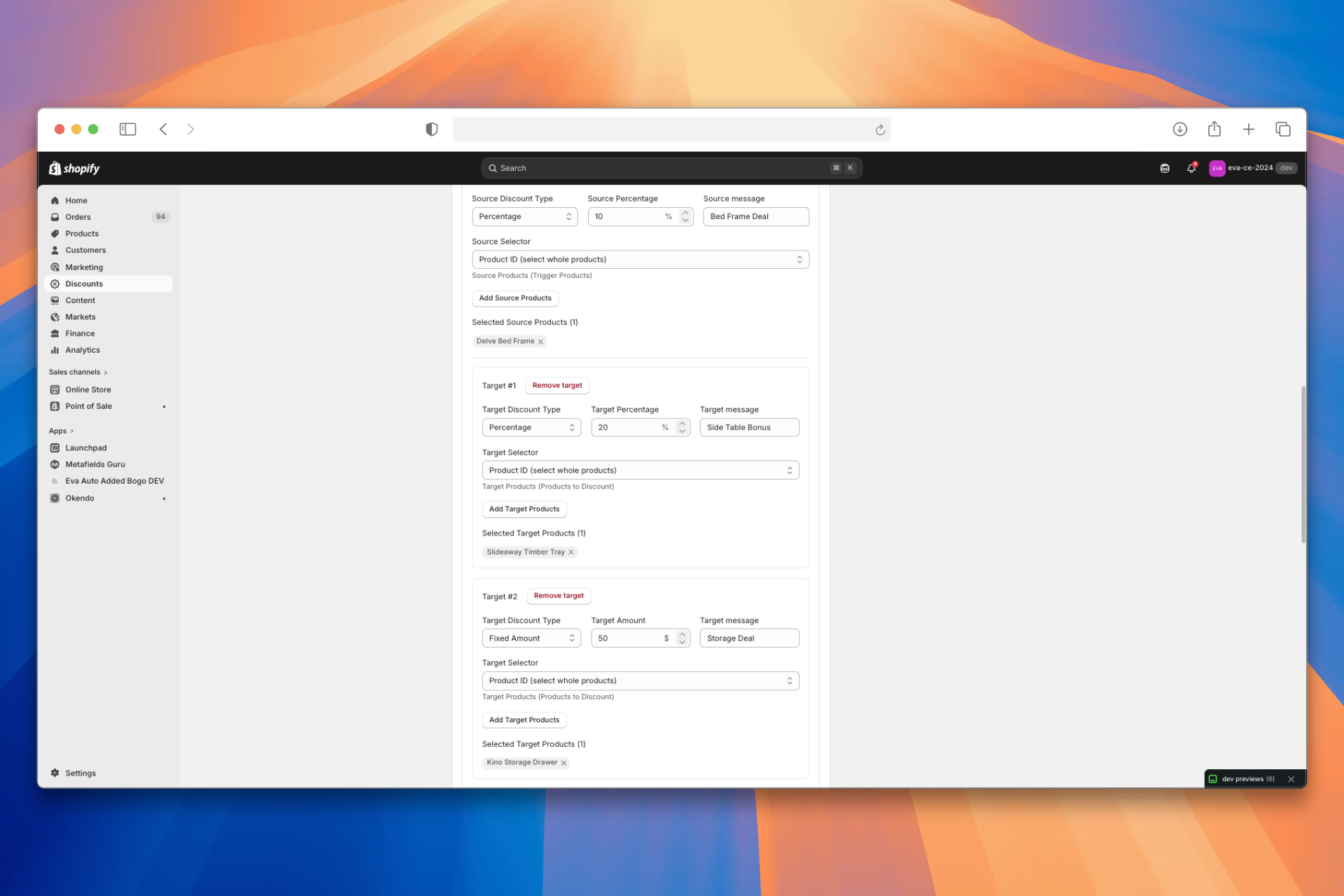
Setup: Source Percentage / Amount 10%. Discount Selection Strategy All so both target groups can run when the bed frame is in the cart.
Unit prices (from the catalog above):
| Item | List price | After discount in this promo |
|---|---|---|
| Delve bed frame | $2,450 | $2,205 (10% off) when the source line qualifies |
| Slideaway Timber Tray | $95 | $76 (20% off) when the target line qualifies |
| Kino Storage drawer | $350 | $300 ($50 fixed off) when the target qualifies |
At checkout:
- Delve bed frame: "Bed Frame Deal 10% OFF" (or your source message), 10% deducted from the bed line
- Slideaway Timber Tray: "Side Table Deal 15% OFF", 15% deducted
- Kino Storage drawer: "Storage Deal $50 OFF", $50 deducted per qualifying line (per your fixed-amount rules)
1 bed frame + 1 timber tray + 1 drawer:
| Line | Calculation | Amount |
|---|---|---|
| Delve bed frame (10% off) | 1 × $2,205 | $2,205 |
| Slideaway Timber Tray (15% off) | 1 × $80.75 | $76 |
| Kino Storage drawer ($50 off) | 1 × $300 | $300 |
| Cart total | $2,581.00 |
Frequently Asked Questions
How does Split Bundle differ from a standard Bundle Discount?
The key difference is that Split Bundle Discount applies independent discounts to both source and target products, while standard Bundle Discount only discounts targets — source items just show a message. Split Bundle also supports multiple target groups with different discount types and values (e.g. 10% off one product, $50 off another) in a single discount instance.
Can I discount source items without discounting any targets?
Yes. Set the Source Percentage / Amount to a value above 0 and set all target discount values to 0 (or remove target groups). However, at least one target product must still be in the cart for the split bundle to activate — the source discount only applies when the bundle conditions are met.
How does minimum quantity work differently in Split Bundle vs Bundle Discount?
In Split Bundle Discount, Minimum quantity applies to source items only — at least one source cart line must have quantity equal to or above the minimum. In standard Bundle Discount, the minimum must be met on both the source side (at least one line) and the total target quantity. This makes Split Bundle simpler to gate.
Can I mix percentage and fixed amount discounts across target groups?
Yes. Each target group has its own Discount Type setting, so you can configure one target group as Percentage (e.g. 15% off) and another as Fixed Amount (e.g. $50 off) within the same Split Bundle instance. The source discount type is also independent.
What does the Discount Selection Strategy do for target groups?
The strategy controls which target groups receive the discount when multiple groups are configured. All discounts every eligible target group. First discounts only the first group (by config order) with eligible items in the cart. Maximum discounts only the group with the highest total discount amount. Source items are always discounted regardless of this setting.
Does Split Bundle Discount work on Shopify POS?
Yes. By default, the Platform setting is Both - POS & Checkout, so the discount applies at both online checkout and POS. You can restrict it to POS Only or Checkout Only if needed.
Notes
- Source items are always discounted when Source Percentage / Amount is greater than
0, regardless of Discount Selection Strategy. The strategy only filters target groups. - Minimum quantity applies to source items only (at least one source line). It does not mirror the bundle rule that totals target quantity must meet a minimum — see Minimum Quantity.
- Fixed ratios can prevent any target discount in a group if target quantity does not form a complete set. Source discounts can still apply — see Fixed ratios.
- RRP (Compare At Price): When Apply Discount To is RRP (Compare At Price) but a product has no RRP, the current selling price is used instead.
- Shared pool (with Limit By Source on): target groups and lines draw from the same allowance; order can matter — see Shared pool.
- No duplicate targets across split bundles in the same discount instance follows the same idea as Bundle Discount — Notes: avoid overlapping target picks in one discount; use separate instances if needed.